
Introduction
NVIDIA announced Cosmos 3 Nano on June 1, 2026. Where Cosmos 2.x made running the model on a GeForce GPU practically impossible, Cosmos 3 can be installed through diffusers — and works on an RTX 5090 (32 GB).
I set up Cosmos 3 Nano on my RTX 5090 machine to generate video from text prompts. A handful of additional configuration steps were required, so I'm documenting the whole process here.
Environment
| Item | Details |
|---|---|
| Machine | NVIDIA GeForce RTX 5090 32 GB / Ubuntu 24.04 |
| Python | 3.11 (fresh conda environment) |
| conda env name | cosmos3 |
| CUDA | 13.0 (Driver 580.126.09) |
Cosmos 3 vs. Cosmos 2.x
Cosmos 2.x (Transfer / Reason) is distributed as NIM (NVIDIA Inference Microservices) containers, which internally run a TRT (TensorRT) engine build. That calibration step requires a data-center GPU in the H100 / H200 class, so when I tested it in May 2026, the RTX 5090 simply couldn't run it.
Cosmos 3 Nano is distributed via diffusers / vLLM, with no quantization calibration needed. As a result, it can be installed with pip alone on a GeForce GPU.
Installation
1. Create a conda environment
To avoid dependency conflicts with my existing Isaac Sim environment, I start with a fresh conda environment.
conda create -n cosmos3 python=3.11 -y
conda activate cosmos3
2. Install dependencies
pip install transformers accelerate
pip install torch torchvision --index-url https://download.pytorch.org/whl/cu130
pip install opencv-python   # required by export_to_video()

# diffusers: the git version is required (see below)
conda run -n cosmos3 pip install "diffusers @ git+https://github.com/huggingface/diffusers.git" -q
Warning (supply chain): The command above pulls the latest HEAD of the repository. Once a stable PyPI release is available, switching to a pinned version (
diffusers==X.Y.Z) is recommended. If you continue using the git version, review the latest commits on huggingface/diffusers before running the install.
3. HuggingFace authentication
hf auth login # enter your HF token
Token scope: A read-only token is sufficient for downloading models. Using a token with write permissions puts your HuggingFace repositories at risk of accidental modification. Generate a read-only token from HuggingFace token settings.
huggingface-cli is deprecated; use the hf command instead.
4. Download the model (~32 GB)
This takes a while, so I run it inside a tmux session.
tmux new -s cosmos3-dl

hf download nvidia/Cosmos3-Nano \
  --local-dir /home/<username>/models/cosmos3-nano
Working Script
Below is the final script that worked. The sections that follow explain why each choice was made.
# test_cosmos3.py
import os
import torch
# Must be set before importing torch (fragmentation workaround)
os.environ["PYTORCH_CUDA_ALLOC_CONF"] = "expandable_segments:True"

from diffusers import Cosmos3OmniPipeline
from diffusers.utils import export_to_video

pipe = Cosmos3OmniPipeline.from_pretrained(
    "/home/<username>/models/cosmos3-nano",
    torch_dtype=torch.bfloat16,
    enable_safety_checker=False,    # For local testing only. Enable cosmos_guardrail in any public-facing service.
)
pipe.enable_sequential_cpu_offload()   # Move sub-modules to CUDA sequentially

result = pipe(
    prompt='{"text": "A robotic arm picking up a red cube on a table"}',
    num_frames=49,
    height=480,
    width=640,
    num_inference_steps=20,
    guidance_scale=6.0,
    generator=torch.Generator(device="cuda").manual_seed(42),
)

export_to_video(result.video, "cosmos3_test.mp4", fps=24)
print("Done: saved as cosmos3_test.mp4")
python test_cosmos3.py
Errors and Fixes
Error 1: Cosmos3OmniPipeline not found in the stable PyPI release
ImportError: cannot import name 'Cosmos3OmniPipeline' from 'diffusers'
As of June 2026, Cosmos3OmniPipeline is not yet included in the stable PyPI release. Install the git version.
conda run -n cosmos3 pip install "diffusers @ git+https://github.com/huggingface/diffusers.git" -q
Note: This pulls the latest HEAD. See the supply-chain warning in Installation step 2.
Error 2: device_map="auto" not supported
NotImplementedError: The 'auto' device is not supported.
Supported strategies are: balanced, cuda, cpu
Cosmos3OmniPipeline does not support device_map="auto". Switching to device_map="balanced" seems like the fix, but it triggers a different error (Error 4), so we'll end up taking a different approach.
Error 3: cosmos_guardrail not installed
ImportError: cosmos_guardrail is not installed.
Please install it with: pip install cosmos_guardrail
Safety Checker is an optional feature. Either install it with pip install cosmos_guardrail, or pass enable_safety_checker=False to from_pretrained() to skip it.
pipe = Cosmos3OmniPipeline.from_pretrained(
    "...",
    torch_dtype=torch.bfloat16,
    enable_safety_checker=False,   # ← add this
)
Important (Safety Checker):
enable_safety_checker=Falseshould only be used in local testing environments. The Safety Checker suppresses generation of violent and other harmful content. For any service or public API where users can provide input, installcosmos_guardrailand keep it enabled.
Error 4: Device mismatch with device_map="balanced"
RuntimeError: Input type (CUDABFloat16Type) and weight type (CPUBFloat16Type) should be the same
device_map="balanced" places some weights on the CPU, while input tensors remain on CUDA — causing a device mismatch.
Remove device_map and use enable_model_cpu_offload() instead. This moves each component to CUDA only during inference and returns it to CPU afterward, keeping devices consistent.
# Remove device_map from from_pretrained
pipe = Cosmos3OmniPipeline.from_pretrained("...", torch_dtype=torch.bfloat16, ...)
pipe.enable_model_cpu_offload()   # ← add this
Error 5: Out of VRAM even with enable_model_cpu_offload()
torch.OutOfMemoryError: CUDA out of memory.
Tried to allocate 1.16 GiB. GPU 0 has a total capacity of 31.87 GiB ...
472.19 MiB is free.
enable_model_cpu_offload() offloads at the component level within the pipeline. The Cosmos 3 Nano Transformer alone uses over 29 GB, so component-level granularity is too coarse.
enable_sequential_cpu_offload() moves things to CUDA at the finer sub-module level, significantly reducing peak VRAM usage. Combined with PYTORCH_CUDA_ALLOC_CONF to address memory fragmentation (must be set before importing torch), this resolves the issue.
import os
os.environ["PYTORCH_CUDA_ALLOC_CONF"] = "expandable_segments:True"  # ← before import

import torch
from diffusers import Cosmos3OmniPipeline

pipe = Cosmos3OmniPipeline.from_pretrained(...)
pipe.enable_sequential_cpu_offload()   # ← replace enable_model_cpu_offload
Note: GUI processes like Xorg can occupy roughly 1.3 GB of GPU memory. If VRAM is tight, stopping those processes before running the script may help.
Error 6: OpenCV not found for export_to_video()
ImportError: export_to_video requires the OpenCV library but it is not installed.
conda run -n cosmos3 pip install opencv-python -q
Results
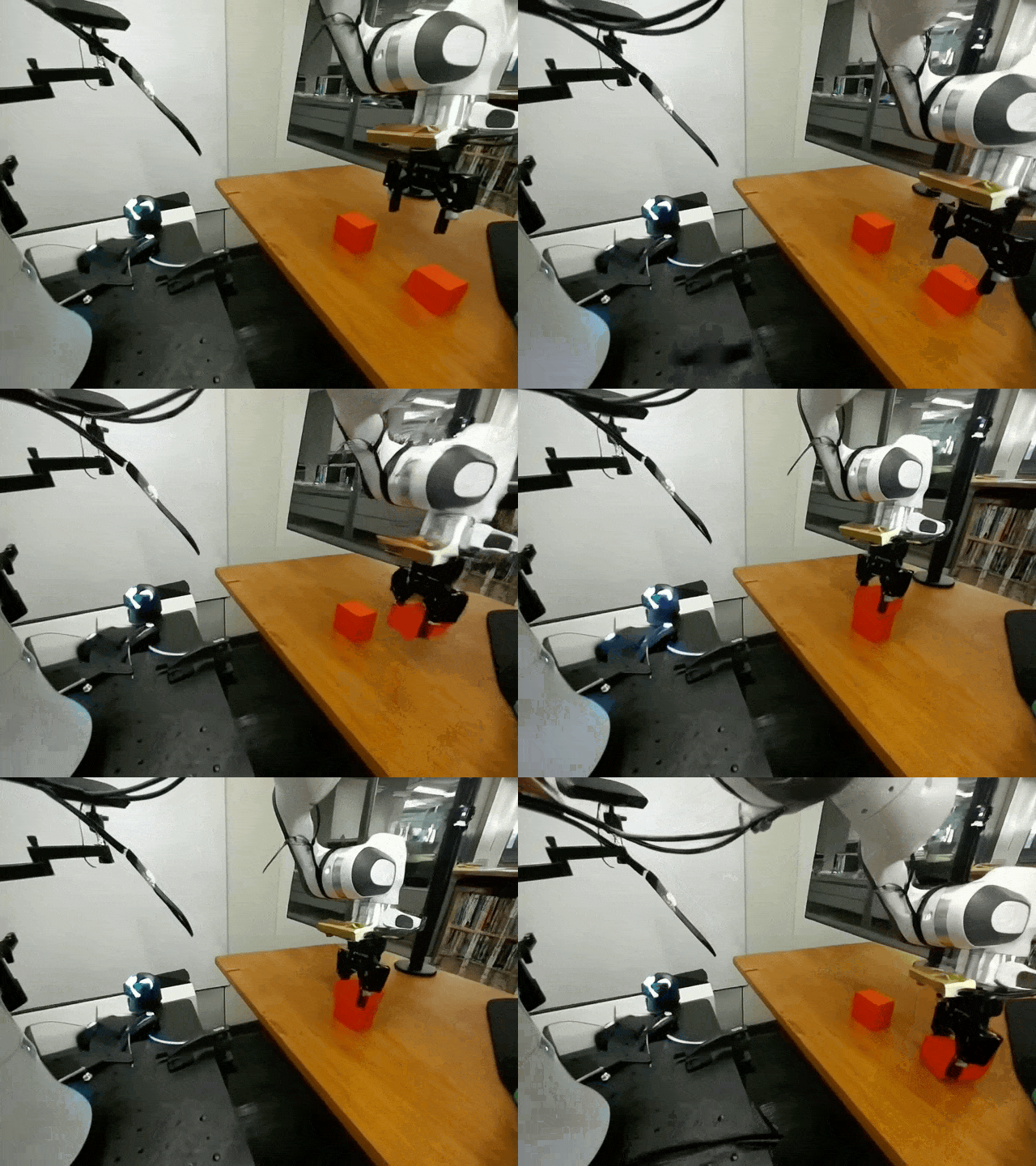
After working through all six errors, I successfully generated a video (MP4) from a text prompt on the RTX 5090 (32 GB), with peak VRAM staying within bounds. I tested two prompts:
A robotic arm picking up a red cube on a table
A robot arm picking up a small object from a conveyor belt in a factory setting
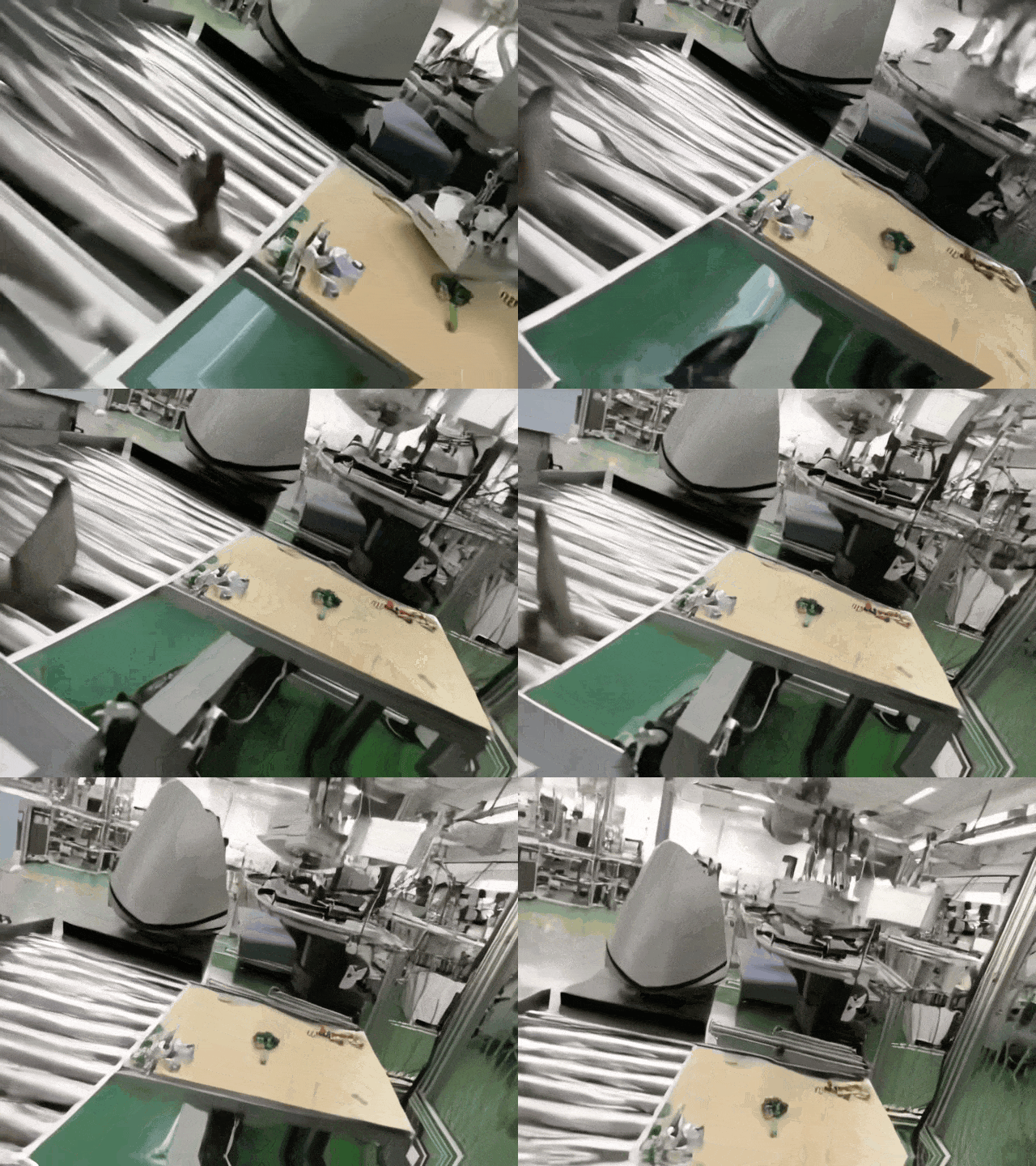
There's a certain atmosphere to it, but the fine details definitely need work 😅
Interested in Robot PoC Development with Isaac Sim and Cosmos?
From GPU environment setup like this article to designing and implementing a full Pick & Place PoC with real robots — integrating Isaac Sim, Cosmos video generation, and custom arms — we provide end-to-end technical support.
A 4-week fixed-price Quick Start Package ($15,000–$18,000) is also available.
Learn more about our Robotics Simulation Service →
Summary
Why Cosmos 2.x (NIM) wouldn't run on GeForce came down to the TRT engine calibration. Cosmos 3 sidesteps that constraint by shipping via diffusers, opening the door for individual developers and small teams with GeForce GPUs.
This test was primarily about verifying that the model runs at all — single-line prompts like these are far from production-ready output. How far Cosmos 3 Nano can go with robotics scenarios (picking, factory environments) will take more prompt experimentation to find out. Image-to-Video mode is also on my list to try.
That said, being able to run Cosmos locally and see what it actually produces was a worthwhile result.
Note for Applications: Accepting User Input
The sample code in this article uses a hardcoded prompt and is safe as-is. However, if you adapt this code to pass external user input directly to the prompt, you'll need to defend against prompt injection (users crafting inputs to abuse the model).
- Restrict user input by length and allowed characters
- Enable the Safety Checker (
cosmos_guardrail) - Moderate generated content before exposing it in a public-facing service
Related Articles
- Isaac Sim Environment Setup: Ubuntu 24.04 — Setting up the GPU environment that runs alongside Cosmos
- Adding Isaac Lab to an Existing Isaac Sim Environment — Running the Isaac Lab RL framework on the same RTX 5090 setup
- Isaac Sim Environment Setup: Windows 11 — Windows-based environment setup with WSL2
- Setting Up Remote Access to Isaac Sim — Running Isaac Sim headlessly via NoMachine + Tailscale
- TM Robot + Isaac Sim Integration via ROS 2 — Connecting a physical robot arm to simulation
- Rule-Based Automation vs. Physical AI — Which One Should You Choose? — Where Cosmos's synthetic-data generation fits in the bigger picture
References
- nvidia/Cosmos3-Nano — HuggingFace
- huggingface/diffusers — GitHub
- PyTorch
enable_sequential_cpu_offload()documentation